 Domains SearchSearch available domain names and claim yours in just a few clicks.
 .GH DomainsFind and register a trusted .gh domain for your business or idea.
 Web HostingAffordable web hosting solutions designed for performance, uptime, and scalability.
 cPanel HostingManage your website without the stress. cPanel hosting gives you everything in one place.
 Reseller HostingCreate, manage, and grow your hosting clients using reliable reseller hosting tools.
 Windows HostingWindows hosting that works smoothly with Microsoft frameworks and applications.
 Email HostingProfessional email hosting that keeps your business communication reliable and secure.
 WordPress HostingFast and secure WordPress hosting optimized for smooth performance and easy management.
 Affiliate ProgramEarn commissions by referring customers to our hosting and domain services.
 .COM Domains
 All DomainsFind the right Ghana domain for your brand and lock it in fast.
 Domain TransferMove your domain to us with a smooth, secure transfer process.
 Whois LookupCheck domain ownership and registration details instantly with our WHOIS lookup.
 SSL CertificatesSecure your website and protect your visitors with trusted SSL certificates.
 VPS HostingUpgrade to VPS hosting today and enjoy better speed, uptime, and flexibility.
 Managed VPSManaged VPS for businesses and developers who want full control without server management worries.
 Dedicated ServersGet maximum speed and reliability with dedicated servers built for serious websites and apps.
 AI Website BuilderStart your website today with our AI builder and go live in minutes.
 Online ShopStart selling online today with your own professional online shop.
 Web Design ServiceProfessional web design services that make your brand stand out online.
 Local SEO
 BlogHelpful articles, tutorials, and updates for building your online presence.
 Contact UsNeed help or more information? Connect with us anytime.
Choosing a VPS is not simply about finding the cheapest plan available.
Different websites and applications need very different amounts of CPU, RAM, storage and bandwidth, so the right choice depends heavily on what you are actually running.
Two businesses with similar-looking websites can have very different hosting needs.
A content-heavy blog behaves nothing like a busy online store processing orders around the clock, and the right VPS reflects that difference rather than treating every website the same way.
For users in Ghana specifically, a few extra factors come into play too.
Server location, local connectivity, pricing, support quality and scalability can all shape which VPS ends up being the right fit for your project.
This guide walks through how to choose a VPS in Ghana by comparing the factors that actually count, rather than jumping straight to the plan with the lowest advertised price.
Things to Consider When Choosing a VPS in Ghana
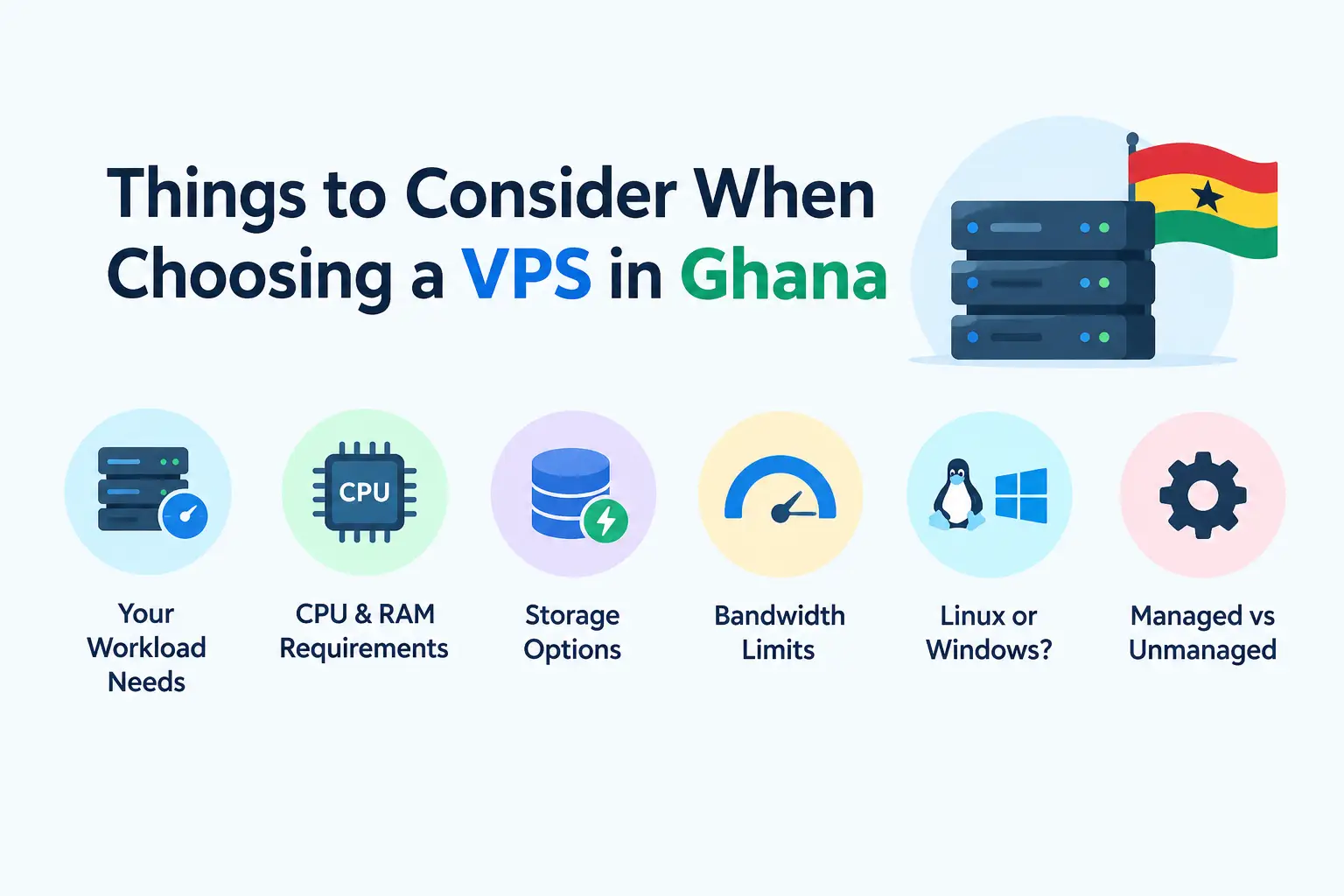
a) Your Website or Application Requirements
Start with what you actually intend to run.
This might be a standard website, an ecommerce store, a custom web application, a database, several websites at once, or a development environment.
Different workloads require different resources.
A simple blog needs far less than a busy online store handling regular transactions, so it helps to be honest about your actual use case before comparing plans.
Writing down your expected traffic and typical usage patterns before shopping around can make this comparison much easier.
A rough estimate is still better than guessing entirely.
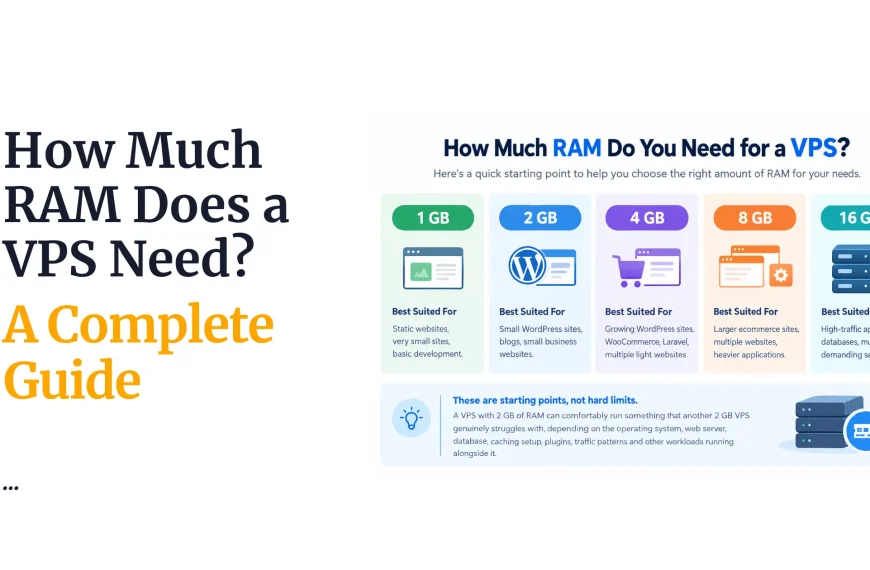
b) RAM
RAM affects how many processes and applications your VPS can handle at the same time.
WordPress sites, ecommerce platforms and database-heavy applications often need more memory than a simple static website.
Rather than following a blanket recommendation, it makes more sense to size your RAM around your specific workload.
A plan that works well for a portfolio site may fall short for a busy online shop.
If you are unsure how much RAM your project needs, starting with a mid-tier plan and monitoring usage over the first few weeks is a sensible approach.
c) CPU Cores
CPU determines how quickly your VPS can process tasks.
This becomes especially important for applications with computationally demanding workloads, such as data processing or complex web applications.
It helps to match your CPU resources to your actual workload, rather than paying for capacity you will never really use.
Overspending on cores your application cannot fully utilize rarely improves performance in practice, and that budget is often better spent elsewhere, such as on RAM or storage.
d) Storage Type and Capacity
Storage comes down to two things: how much you get, and what type it is.
SSD and NVMe storage generally offer noticeably better performance than traditional HDD storage, particularly for database-driven websites.
When estimating how much storage you need, account for your website files, databases, media library, log files and any backups you plan to keep on the server itself.
e) Bandwidth
Bandwidth covers how much data your website or application is expected to transfer over a given period.
This becomes particularly important for high-traffic websites, ecommerce stores, download-heavy sites and media-rich applications.
Check whether your provider imposes a hard bandwidth limit or works under a broader usage policy instead, since this can affect how you plan for future traffic growth.
Sites that expect seasonal spikes, such as promotional sales periods, should pay particular attention to this factor.
f) Server Location
Server location can affect the latency your visitors experience.
Consider where the majority of your audience is actually based before choosing a location.
For a Ghana-focused website, it is worth comparing the available infrastructure and connectivity options directly, rather than assuming server location alone determines overall performance.
Network quality and routing count just as much as physical distance.
A server physically close to Ghana but poorly connected can still underperform compared to a well-routed server further away.
g) VPS Pricing
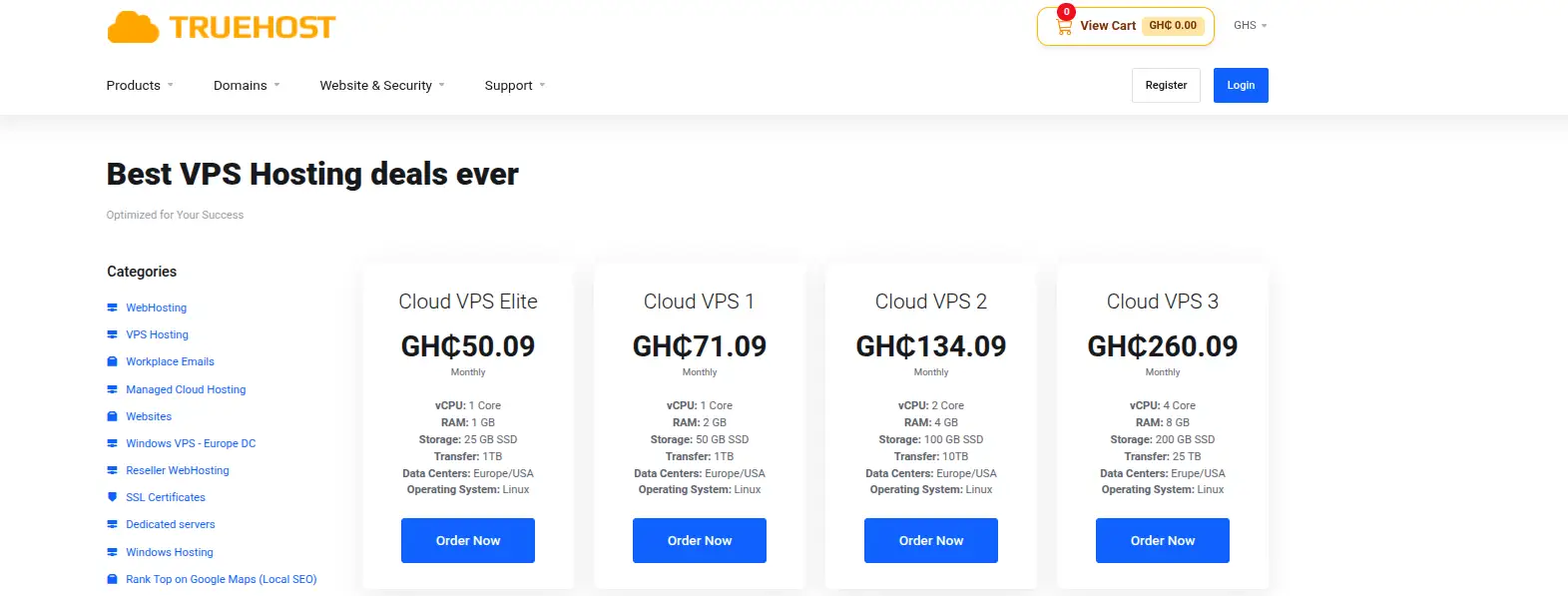
Compare the actual total cost rather than just the headline monthly price.
Check the billing cycle carefully, since some providers offer lower rates only on longer commitments.
Look closely at renewal pricing too, since introductory rates often increase once the first term ends.
Check for additional costs such as control panels, backups or other add-on services, and compare exactly what resources you are getting for the price quoted.
A plan that looks cheaper at first glance can end up costing more once every extra fee is added in.
Reading the full pricing page, not just the homepage banner, avoids this kind of surprise.
h) Managed vs. Unmanaged VPS
With managed VPS hosting, the provider handles more of the server administration on your behalf.
With unmanaged VPS hosting, you get more control, but you also take on more responsibility.
Choose based on your own technical experience and how much server management you actually want to handle yourself.
Neither option is universally better, since the right choice depends entirely on your comfort level.
Many businesses start with managed hosting, then move toward unmanaged plans as their technical confidence grows.
i) Operating System Options
Check which operating systems are actually available on the plans you are considering.
Linux distributions are common for web hosting and development work, and most providers offer a handful of popular options.
Make sure whichever operating system you choose actually supports the software and applications you intend to run, since mismatches here can cause headaches after deployment.
Confirming this before signing up avoids the frustration of discovering an incompatibility only after your site is already live.
j) Root Access and Control
Root or administrative access gives you far greater control over your server.
This is especially useful for developers and users who need to install and configure their own software freely.
It is worth checking exactly what level of access a provider offers before signing up, since some plans restrict certain administrative functions even when root access is technically included.
Reading the fine print here can save confusion later, particularly for anyone planning custom server configurations.
k) Control Panel
Consider whether you need a control panel such as cPanel, or another server management interface.
A control panel is useful for managing websites, domains, databases, email and other hosting functions from one place.
Check whether the control panel is included in the advertised VPS price, or charged as a separate add-on, since this can meaningfully affect your total cost over the life of the plan.
l) Security Features
Check what firewall options, DDoS protection, monitoring tools and other security features are available on a given plan.
Look at what security responsibilities remain with you as the account holder in addition to what the provider covers.
A VPS still needs regular updates, strong authentication practices and sensible configuration on your end, regardless of what security tools your provider makes available.
Treating security as a shared responsibility, rather than something entirely handled by the host, leads to far fewer surprises.
m) Backup and Recovery
Find out whether backups are included with your plan, or offered as a separate paid service. Check how often backups run and how long they are retained.
It also helps to know exactly how restoration works, and to consider where backups are actually stored.
Backups kept entirely on the same VPS offer far less protection than those stored separately, since a single server failure could wipe out both your live site and its backup at once.
n) Network Performance and Uptime
A VPS needs a reliable network connection, not just powerful hardware sitting behind it.
Look closely at a provider’s infrastructure and their stated uptime commitments.
Consider how well that infrastructure connects to your target audience specifically, since a technically strong server with poor routing to your region can still deliver a disappointing experience.
Even a small amount of extra latency can affect how fast pages feel to real visitors.
o) Customer Support
Check whether technical support is genuinely available when you actually need it, not just during business hours in a different time zone.
Look at the support channels offered and typical response times.
For beginners in particular, good support can make a significant difference when dealing with server issues you are not equipped to solve alone.
Testing a provider’s support responsiveness before committing, perhaps with a simple pre-sales question, can offer a useful preview of what to expect later.
p) Scalability
Check whether you can upgrade RAM, CPU or storage as your website grows over time.
Find out exactly how these upgrades work, including whether they require downtime.
A VPS that can scale alongside your needs can save you from a stressful full migration to another server later, once your current plan simply runs out of room.
Providers that make scaling simple, ideally through a self-service dashboard, tend to save the most hassle down the line.
q) Resource Allocation
Do not assume that every VPS advertised with the same number of CPU cores or the same amount of RAM will perform identically.
Look closely at how resources are actually allocated behind the scenes.
Consider whether CPU resources are dedicated, shared among several accounts, or subject to specific throttling limits, since this can significantly affect real-world performance even when the specs look identical on paper.
Two plans with matching specs on paper can behave very differently once real traffic hits them.
r) Technical Specifications
Look beyond the basic RAM and CPU numbers advertised on a plan.
Check the virtualization technology used, storage performance, network interface specifications, and IPv4 or IPv6 availability where relevant to your project.
Developers and other technically demanding users may need to pay closer attention to these details than a typical small business website owner would.
For a straightforward website, these specifics rarely make a noticeable difference, but for specialized applications, they can carry real weight.
s) Provider Reputation
Consider a provider’s overall reliability and track record before committing.
Look at customer feedback and how the company has historically handled technical issues or outages.
It is worth being careful not to base your decision entirely on reviews alone, but using them alongside a provider’s actual specifications and policies gives you a more complete picture.
A pattern of complaints about the same issue, such as slow support or frequent downtime, is worth taking seriously even if individual reviews vary.
t) Compatibility With Your Software
Check whether the VPS supports your preferred programming language, database system, CMS or other applications.
Confirm the specific PHP, Python, Node.js, Java or other runtime versions you need are actually available where relevant.
Taking this step early can prevent frustrating compatibility problems after you have already deployed your website or application.
Testing compatibility on a small scale before fully committing your production site can also help catch issues early.
u) VPS Resource Monitoring
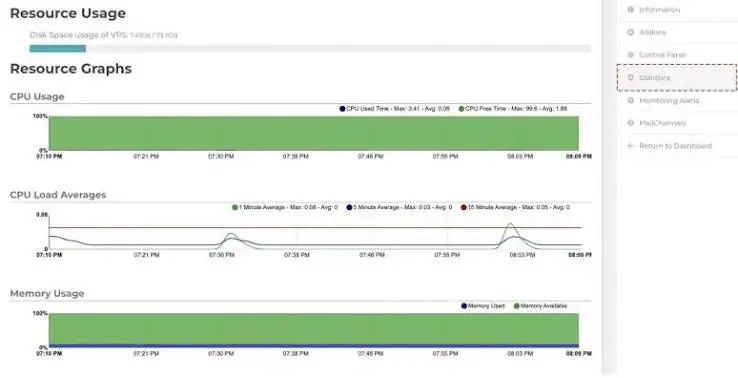
Check whether your provider gives you tools to monitor CPU, RAM, storage and bandwidth usage directly.
Monitoring helps you identify bottlenecks early, and determine when an upgrade is genuinely necessary rather than guessing.
Regularly reviewing these numbers also helps you spot unusual spikes before they turn into bigger problems.
v) Migration and Setup Options
If you are moving from another hosting provider, check whether migration assistance is actually available.
Find out whether the provider offers tools or hands-on support for transferring your websites and applications over.
Having this kind of support available can make switching providers considerably easier, especially if you are not confident handling a full migration on your own.
A provider willing to guide you through the process, rather than leaving you to figure it out alone, can turn a stressful switch into a fairly smooth one.
Choose the Right VPS for Your Website With Truehost
Working out how to choose a VPS in Ghana ultimately comes down to comparing resources, storage, bandwidth, server location, pricing, security, support and scalability against your own actual needs, rather than chasing the cheapest number you can find.
The right VPS is one that gives you enough resources to run comfortably, without paying for capacity you genuinely do not need.
Truehost is worth considering as an option for VPS hosting, offering a range of plans built around different resource levels and budgets.
Whether you are launching your first website or scaling an established business, taking the time to work through how to choose a VPS in Ghana properly pays off well beyond the initial setup.
Compare Truehost’s available VPS plans against your actual requirements, and choose the one that fits your website today while still leaving room to grow.