 Domains SearchSearch available domain names and claim yours in just a few clicks.
 .GH DomainsFind and register a trusted .gh domain for your business or idea.
 Web HostingAffordable web hosting solutions designed for performance, uptime, and scalability.
 cPanel HostingManage your website without the stress. cPanel hosting gives you everything in one place.
 Reseller HostingCreate, manage, and grow your hosting clients using reliable reseller hosting tools.
 Windows HostingWindows hosting that works smoothly with Microsoft frameworks and applications.
 Email HostingProfessional email hosting that keeps your business communication reliable and secure.
 WordPress HostingFast and secure WordPress hosting optimized for smooth performance and easy management.
 Affiliate ProgramEarn commissions by referring customers to our hosting and domain services.
 .COM Domains
 All DomainsFind the right Ghana domain for your brand and lock it in fast.
 Domain TransferMove your domain to us with a smooth, secure transfer process.
 Whois LookupCheck domain ownership and registration details instantly with our WHOIS lookup.
 SSL CertificatesSecure your website and protect your visitors with trusted SSL certificates.
 VPS HostingUpgrade to VPS hosting today and enjoy better speed, uptime, and flexibility.
 Managed VPSManaged VPS for businesses and developers who want full control without server management worries.
 Dedicated ServersGet maximum speed and reliability with dedicated servers built for serious websites and apps.
 AI Website BuilderStart your website today with our AI builder and go live in minutes.
 Online ShopStart selling online today with your own professional online shop.
 Web Design ServiceProfessional web design services that make your brand stand out online.
 Local SEO
 BlogHelpful articles, tutorials, and updates for building your online presence.
 Contact UsNeed help or more information? Connect with us anytime.
Here is a number that should stop any business owner in their tracks: 70% of small business websites fail to generate meaningful leads or conversions .
Not don’t perform as well as hoped. Fail. Completely.
I see it all the time in Ghana, beautiful websites that cost a small fortune, launched with excitement, and then… nothing.
No calls, no sales, no ROI. Just a digital ghost town with a pretty facade.
The problem is not that these business owners aren’t smart or hardworking.
The problem is that most people approach a website launch like hanging a sign outside a shop.
You put it up, turn on the lights, and wait for customers to wander in.
A website isn’t a sign. It is infrastructure, and the most important business asset you will ever build, if you treat it like one.
In this guide, I’m going to walk you through exactly how to launch a website that doesn’t just look good, but actually works.
We will cover everything from pre-launch strategy to post-launch promotion, with specific tips for Ghanaian businesses.
By the time you are done, you will have a launch checklist so thorough that your site won’t just survive its first day, it will thrive.
Pre-Launch Phase
Most people start building a website by picking a template and filling in the blanks.
That is backwards.
Before you touch a single line of code or drag a single image into place, you need to answer one question:
What is this website actually supposed to do?
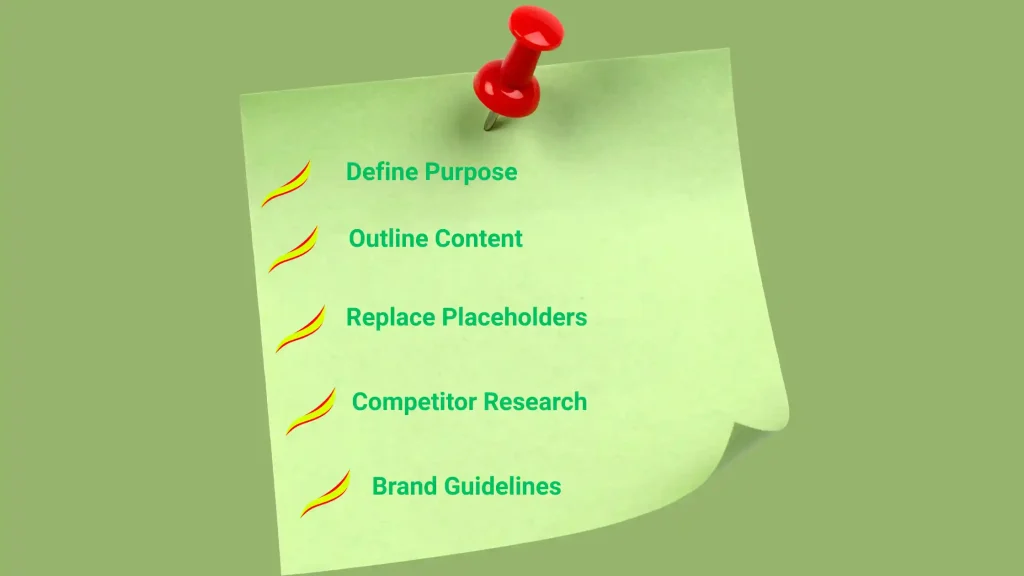
1) Define Your Purpose and Audience with Precision
To sell my products isn’t specific enough.
To sell handmade shea butter products to women aged 25-40 in Accra and Kumasi who shop online for natural skincare is specific.
This is why specificity is very important: every design choice, from the colours you use to the words on your buttons, should serve a goal.
If you are selling luxury goods, your site needs to feel premium.
If you are generating leads for a service business, your contact form needs to be impossible to miss.
Before you build anything, write down three things:
a) Who your ideal visitor is
b) What action you want them to take, and
c) What is stopping them from taking it right now
If you can’t answer all three, you are not ready to launch.
2) Outline Your Content (Create a Sitemap)
Building pages on the fly is how you end up with a messy navigation bar and missing key information. Map it out first:
- Homepage: The first impression. Should immediately answer what do you do? and why should I care?
- About Us: Your story, your values, your team. People buy from people they trust.
- Products / Services: Clear descriptions, transparent pricing, high-quality images.
- Blog / Resources: Not mandatory for every business, but critical if you want organic traffic.
- Contact: Phone number, email, physical address (if applicable), contact form. Make it easy.
- Legal: Privacy Policy, Terms of Service, Refund Policy. Non-negotiable for credibility and compliance.
Why this is critical for Ghanaian businesses: In Ghana, consumer trust is fragile.
A 2025 industry report noted that many buyers fear fraud, non-delivery, and data misuse.
Your website needs to explicitly address these concerns with clear policies and trust signals.
3) Replace Every Single Bit of Placeholder Content
I can’t tell you how many launched websites I have seen with lorem ipsum text still lurking in the footer or a blog post titled Hello World.
And honestly, there is nothing more offputting!
Before you go live:
- Proofread everything. Twice. Get someone else to read it too.
- Verify your contact details, business hours, and social media links.
- Make sure your pricing is accurate and consistent across all pages.
- Check that your calls-to-action (CTAs) actually make sense. “Click here” is weak. “Get your free quote” is strong.
4) Research Your Competitors
Spend an hour looking at 5-10 businesses similar to yours, not to copy them, but to understand what works and what doesn’t.
What design elements do they all use? What is missing from their sites that you could offer? What makes you trust one site over another?
This is about knowing the landscape so you can stand out.
5) Establish Brand Guidelines
Consistency builds trust. Before you launch, settle on:
- Colours: 2-3 primary colours, used consistently
- Fonts: 1-2 fonts max, used for headings and body text
- Logo: Properly sized and placed on every page
- Tone of voice: Professional? Friendly? Playful? Pick one and stick with it.
When your site looks like a collection of random ideas thrown together, visitors notice.
They may not articulate it, but they feel it, and that feeling makes them less likely to buy.
Technical Foundation and Security
This is where most people get lost. The strategy and content are ready, but the technical setup feels intimidating.
Let us break it down.
1) Choose Reliable Hosting
Your hosting is the foundation your entire business sits on.
Cheap, unreliable hosting means slow load times, frequent downtime, and frustrated visitors who leave before they ever see your carefully crafted content.
If you are in Ghana, Truehost offers local hosting with servers positioned to serve Ghanaian and West African audiences.
That means faster load times for your local customers compared to hosting based in Europe or the US.
What to look for in hosting:
- Speed: Ask about server locations and CDN (Content Delivery Network) integration
- Support: 24/7 availability, preferably with local support during Ghana business hours
- Scalability: Can you upgrade easily when your traffic grows?
- SSL: Free SSL certificate included (more on this below)
Pro Tip: Don’t launch on a Friday or weekend. I have seen too many launches go sideways with no technical support available until Monday.
Launch on a Monday or Tuesday so you have full support during the critical first 48 hours.
2) Secure Your Site with SSL
SSL (Secure Sockets Layer) encrypts data between your website and your visitors.
Without it, browsers label your site as Not Secure in the address bar, a guaranteed trust killer.
The good news: most reputable hosts, including Truehost, offer free SSL certificates through Let’s Encrypt. There is no excuse to launch without it.
How to check: Before you announce your launch, type https://yourdomain.com into your browser. If you see a padlock icon next to the URL, you are good. If you don’t, fix it first.
3) Create a Backup Strategy Before You Go Live
Here is something nobody tells you: the most dangerous time for your website is right after you launch.
One wrong plugin update, one accidental deletion, and everything disappears.
Before you make your site public, take a full backup of your website files and database.
Most hosting plans offer automated backups, but verify that they are running.
If your host doesn’t offer backups, set up your own using a plugin or manual export.
According to industry research, 25% of all webpages that existed between 2013 and 2023 are no longer accessible . Don’t let your site become part of that statistic.
4) Set Up Analytics and Search Tools Before Day One
If you launch without analytics, you are flying blind. You won’t know where your visitors come from, what they do on your site, or why they leave.
Minimum setup:
- Google Analytics 4 (GA4): Tracks traffic sources, user behaviour, conversions
- Google Search Console: Shows how Google sees your site, helps you appear in search results
- Google Tag Manager: Optional but helpful for managing all your tracking codes in one place
Install these before you launch, not after. You want data from your very first visitor.
Also set up goal tracking in GA4 for your key conversions, whether that is form submissions, product purchases, or newsletter signups.
Without goals, you are just counting visitors, not measuring success.
Quality Assurance
This is the make-or-break phase. Everything you have built so far comes down to one question: does it actually work?
1) Test Every Single Interactive Element
Click every link. Fill out your contact form and make sure the email actually arrives.
If you have a store, go through a test purchase, yes, actually pay for something and refund it.
Test login areas, search bars, and any interactive elements.
Common failure points:
- Form submissions that don’t send emails
- Broken links that lead to 404 pages
- Social media icons linked to the wrong accounts
- Checkout processes that fail at the last step
Use a tool like Broken Link Checker to scan your entire site for broken links automatically.
It is faster than clicking manually and catches things you would never find on your own.
2) Check Mobile Responsiveness
In Ghana, mobile internet penetration is nearly 70% . If your site doesn’t work perfectly on phones, you’re turning away the majority of your potential customers.
This is how to test:
- Resize your browser window to mobile width (around 375px)
- Use Chrome’s device toolbar to simulate different phones
- Actually pull out your phone and visit your site
What to check:
- Buttons are large enough to tap (not pinch and zoom)
- Text is readable without zooming
- Images scale properly without being cut off
- Navigation is usable on a small screen
3) Cross-Browser Testing
Your site might look perfect in Chrome but break in Safari or Firefox. Test it in:
- Chrome (most common)
- Safari (popular on iPhones and Macs)
- Firefox
- Edge (Windows default)
Don’t have all of them? Ask a friend with a different setup to take a look, or use a service like BrowserStack.
4) Optimise Page Speed
Remember those statistics from the opening? 53% of visitors leave if a mobile site takes more than 3 seconds to load . A 1-second delay reduces conversions by 7% .
Speed is not a nice-to-have. It is a competitive advantage.
Quick fixes for speed:
- Compress images: Use TinyPNG or ShortPixel to reduce file sizes without losing quality
- Enable caching: Most hosts offer caching options; turn them on
- Minimise plugins: Every plugin adds code. Remove what you don’t need.
- Use a CDN: Truehost includes CDN integration; make sure it is active
Run your site through Google PageSpeed Insights. It will give you a score and specific recommendations for improvement.
5) Final SEO Setup
Search engines won’t find your site automatically. You need to help them.
Before launch:
- Every page needs a unique meta title and meta description (this is what shows in search results)
- Every image needs alt text (helps accessibility and SEO)
- Headings should be structured properly (H1 for page titles, H2 for sections)
- Check your robots.txt file to ensure search engines aren’t blocked
- Remove any “noindex” tags from your live pages
If you are using a platform like WordPress, plugins like Yoast or Rank Math make this much easier.
Launch Day and Post-Launch
You have tested. You have optimised. You are now ready.
1) Take Your Site Out of Maintenance Mode
If you have been using a coming soon plugin or maintenance mode, now is the time to turn it off.
Double-check that your homepage and all important pages are visible to the public.
Also do a final check from a device that has never visited your site before. Use a friend’s phone or a private browsing window.
Cache can trick you into thinking everything is working when it is not.
2) Submit Your Sitemap to Search Engines
Immediately after going live:
- Go to Google Search Console
- Submit your XML sitemap (usually yourdomain.com/sitemap.xml)
- Do the same for Bing Webmaster Tools
This tells search engines that you are open for business and your site ready to be crawled.
3) Set Up 301 Redirects (If You are Replacing an Old Site)
If you are launching a new site on an existing domain, any old URLs that have changed need 301 redirects.
This preserves your SEO rankings and ensures visitors don’t land on broken pages.
4) Announce Your Launch with Purpose
Don’t just post a link on social media and hope. Craft an announcement that gives people a reason to visit.
What to include:
- What your site does and who it is for
- A special offer for early visitors (discount code, free consultation, etc.)
- A clear call-to-action (“Shop now,” “Get your quote,” “Read the blog”)
Use your email newsletter, Instagram, LinkedIn, and any other channels where your audience hangs out.
5) Monitor Everything Closely in the First 48 Hours
This is the most important period. Watch for:
- Analytics: Is traffic being recorded? Are people behaving as expected?
- Forms and orders: Are emails arriving? Are payments processing correctly?
- Error logs: Your hosting dashboard will show server errors if something’s wrong
- Social mentions: Is anyone talking about your launch? Engage with them.
If something breaks, fix it immediately. The first visitors to your site are your most engaged potential customers. Don’t let them down.
6) Prepare for the Long Game
Now, something most “how to launch a website” guides won’t tell you is that your launch is not the finish line.
It is the starting line.
Actually, 43% of site owners plan to invest in speed and performance improvements post-launch .
The smart ones are already planning their next iteration.
Post-launch priorities:
- Monthly reviews: Check analytics, fix broken links, update content
- A/B testing: Test different headlines, CTAs, and layouts to improve conversions
- Content updates: Fresh content keeps visitors coming back and helps SEO
- Security updates: Keep your CMS, plugins, and themes updated
In the End
The difference between a website that launches and a website that succeeds is mindset.
If you treat your site like a brochure, something you set up once and forget about, you will join that 70% of small business websites that fail to generate meaningful results .
But if you treat it like infrastructure, a critical business asset that needs planning, testing, maintenance, and ongoing optimization, you will build something that actually works.
Ready to launch? Truehost offers hosting plans designed for Ghanaian businesses, with local servers, 24/7 support, free SSL, and easy scalability as you grow.
Be it that you are launching a blog, an online store, or a corporate website, we’ve got you covered.