 Domains SearchSearch available domain names and claim yours in just a few clicks.
 .GH DomainsFind and register a trusted .gh domain for your business or idea.
 Web HostingAffordable web hosting solutions designed for performance, uptime, and scalability.
 cPanel HostingManage your website without the stress. cPanel hosting gives you everything in one place.
 Reseller HostingCreate, manage, and grow your hosting clients using reliable reseller hosting tools.
 Windows HostingWindows hosting that works smoothly with Microsoft frameworks and applications.
 Email HostingProfessional email hosting that keeps your business communication reliable and secure.
 WordPress HostingFast and secure WordPress hosting optimized for smooth performance and easy management.
 Affiliate ProgramEarn commissions by referring customers to our hosting and domain services.
 .COM Domains
 All DomainsFind the right Ghana domain for your brand and lock it in fast.
 Domain TransferMove your domain to us with a smooth, secure transfer process.
 Whois LookupCheck domain ownership and registration details instantly with our WHOIS lookup.
 SSL CertificatesSecure your website and protect your visitors with trusted SSL certificates.
 VPS HostingUpgrade to VPS hosting today and enjoy better speed, uptime, and flexibility.
 Managed VPSManaged VPS for businesses and developers who want full control without server management worries.
 Dedicated ServersGet maximum speed and reliability with dedicated servers built for serious websites and apps.
 AI Website BuilderStart your website today with our AI builder and go live in minutes.
 Online ShopStart selling online today with your own professional online shop.
 Web Design ServiceProfessional web design services that make your brand stand out online.
 Local SEO
 BlogHelpful articles, tutorials, and updates for building your online presence.
 Contact UsNeed help or more information? Connect with us anytime.
The website started out perfectly fine on shared hosting, but somewhere along the way traffic grew, content piled up, applications got added, and resource usage started creeping toward the plan’s limits.
Upgrading isn’t automatically necessary just because a website is growing.
Plenty of sites grow comfortably within shared hosting for years. But certain signs do make the move worth considering, and knowing how to migrate from shared hosting to VPS properly can save you a lot of stress once you decide it’s time.
This guide walks through the full process, starting with the practical how-to steps, then covering the signs that actually justify the upgrade, and finishing with the mistakes worth avoiding along the way.
Whether you’re already convinced VPS is the right move or still weighing it up, working through these sections in order should give you a clear picture either way.
How to MIgrate From Shared Hosting to VPS
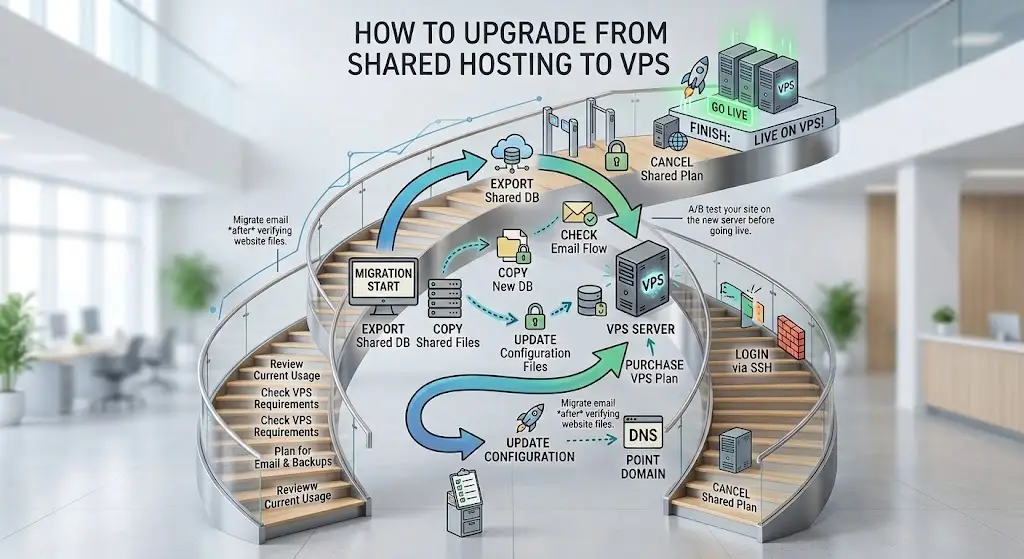
This is the main walkthrough, covering everything from checking your current usage through to safely retiring your old hosting plan.
1) Check Your Current Hosting Usage
Before doing anything else, look at your actual usage numbers: CPU, RAM, storage, inodes, bandwidth, database usage, number of websites, email accounts and current traffic.
This gives you a realistic starting point rather than guessing at what you might need.
Most hosting control panels show these figures somewhere in the dashboard, often under a usage or statistics section.
Pulling these numbers together before you start shopping for a VPS plan means you’re comparing options against your actual situation, rather than against a vague sense that things feel slow lately.
2) Determine Your VPS Requirements
Use your current usage to estimate vCPU, RAM, storage and bandwidth needs, along with your preferred operating system, management level and control panel.
Don’t simply buy the biggest VPS available.
Match the resources to your actual workload instead.
It’s worth building in a bit of headroom above your current usage, since the whole point of moving to VPS is usually to accommodate growth rather than just relocate the same tight limits onto a different server.
Overshooting by a wide margin, though, just means paying for capacity that sits unused.
3) Choose Between Managed and Unmanaged VPS
Managed VPS means the provider handles more of the server administration, which suits users who don’t want to manage Linux or server configuration themselves, though it usually costs more.
Unmanaged VPS gives you more control and more responsibility, and requires more technical knowledge.
Truehost Ghana currently offers both managed and unmanaged VPS options.
4) Choose Your VPS Control Panel
Options here typically include cPanel, Plesk, other available panels, or no control panel at all.
A control panel can make the transition considerably easier for anyone coming from cPanel based shared hosting, since the interface stays familiar even though the underlying environment has changed.
5) Purchase and Set Up the VPS
Select the appropriate VPS, choose your operating system, configure the server, install a control panel where applicable, obtain the VPS IP address, and set up your security credentials before moving any website content over.
6) Back Up Your Existing Website
Back up website files, databases, email, DNS records, SSL certificates or configuration where applicable, and any important configuration files.
This is also the point where it’s worth emphasizing that you shouldn’t cancel the shared hosting account yet, since it still serves as your fallback.
7) Migrate Your Website to the VPS
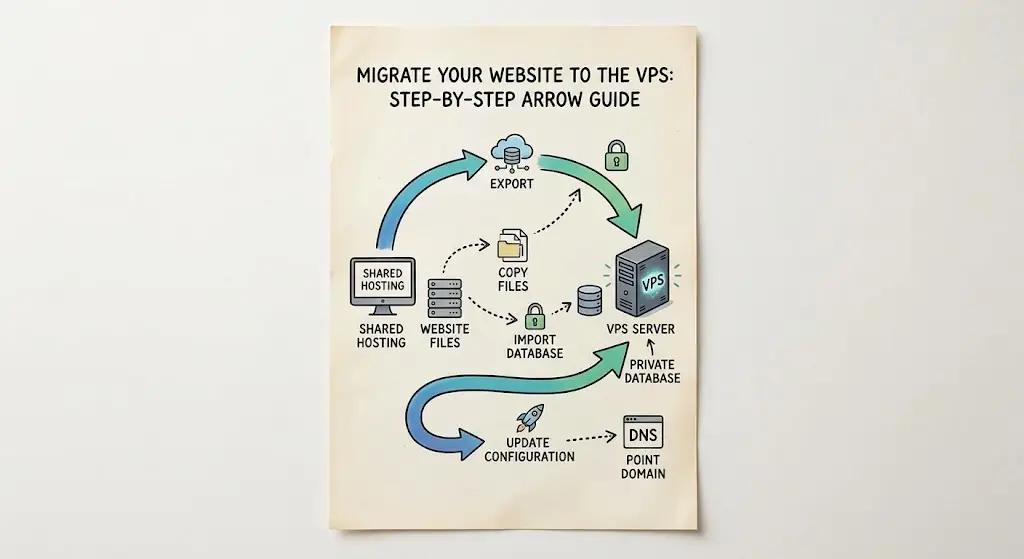
This covers files, databases, domain configuration, email, application settings, and multiple websites where relevant, along with cPanel based migration tools if both environments support them.
Truehost’s migration service specifically covers upgrades from shared or reseller hosting to VPS, and estimates shared to VPS migrations at up to 48 hours.
This is often the step people feel most anxious about, mostly because it’s the point where things could genuinely go wrong if rushed.
Taking a methodical approach here, working through files, then databases, then email, rather than trying to move everything simultaneously, tends to make it much easier to catch and fix problems as they come up.
8) Configure Your Domains on the VPS
Add your domains, create DNS records, point domains to the VPS, and update nameservers if appropriate.
This also includes A records, subdomains and any email related DNS records that need to move across alongside the rest of the site.
9) Install SSL Certificates
Set up HTTPS and SSL configuration on the new server, verify every domain and subdomain individually, and check for mixed content issues before considering the site fully secured on its new environment.
10) Test the Website Before Switching Completely
Check the homepage, internal pages, forms, login, database functionality, images, downloads, ecommerce checkout, email, APIs, the mobile version, and the admin dashboard.
This step catches most problems before real visitors ever see them.
11) Update DNS and Point Traffic to the VPS
Once testing looks solid, update your DNS so traffic actually starts flowing to the new server.
DNS propagation can take some time to complete fully across different regions and providers, so expect a short window where things settle.
12) Monitor the Website After Migration
Keep an eye on CPU, RAM, storage, traffic, error logs, website uptime, response times and database performance in the days following the move, since this is when unexpected issues tend to surface.
13) Keep the Old Hosting Active Temporarily
Don’t cancel shared hosting right away.
Keeping it active gives you a fallback, allows further testing, prevents unnecessary downtime, and gives DNS time to fully settle before you commit to the switch permanently.
14) Cancel the Old Shared Hosting Plan
Only cancel once the website works correctly, DNS fully points to the VPS, email is functioning, backups exist, and no major errors remain.
Rushing this step is one of the more common regrets people have after migrating.
Give yourself a reasonable buffer, at least a week or two, where everything on the new server has been running smoothly before pulling the trigger on cancellation.
That buffer costs you a little extra in overlapping hosting fees, but it’s a small price compared to being locked out of a fallback if something unexpected surfaces later.
When Should You Upgrade From Shared Hosting to VPS?
Before getting into the mechanics of migration itself, it helps to understand what actually signals it’s time to make the move.

1) Your Website Is Consistently Using Its Shared Hosting Resources
Watch for consistently high CPU usage, RAM or resource limits being hit, disk space or inode limits filling up, bandwidth or traffic limits being reached, and repeated resource limit notifications from your host.
Occasional spikes aren’t necessarily a reason to upgrade on their own, but a consistent pattern usually is.
A single busy day rarely means much on its own.
What actually signals a real problem is the same warning showing up week after week, regardless of what’s happening on the site at the time.
That kind of repeated pattern is usually a much more reliable signal than any single bad afternoon.
2) Your Website Has Started Slowing Down
Slower page loads, longer server response times, and struggles on database heavy websites can all point toward outgrowing shared hosting.
That said, hosting isn’t always the only cause of slow performance, so it’s worth ruling out bad code or poor configuration first.
3) Your Website Is Getting More Traffic
Growing visitor numbers, traffic spikes, seasonal traffic, marketing campaigns, viral content, or ecommerce promotions can all place real strain on shared resources, even if the site was running fine before the surge started.
4) You Need More Server Control
If you need custom server configurations, want to install specific software, need to choose server level settings, or want to run applications that aren’t supported on shared hosting, root or SSH access on a VPS becomes genuinely useful rather than optional.
5) You’re Running Multiple Websites or Applications
Several websites under one server, client websites, web applications, APIs, databases, or development and staging environments all tend to benefit from the extra headroom a VPS provides compared to a shared plan.
6) Your Website Has Outgrown Its Current Hosting Environment
The decision to upgrade should be based on actual resource requirements rather than choosing VPS simply because it sounds more powerful. If your current numbers genuinely justify it, the move makes sense. If not, it can usually wait.
Common Mistakes When Upgrading From Shared Hosting to VPS
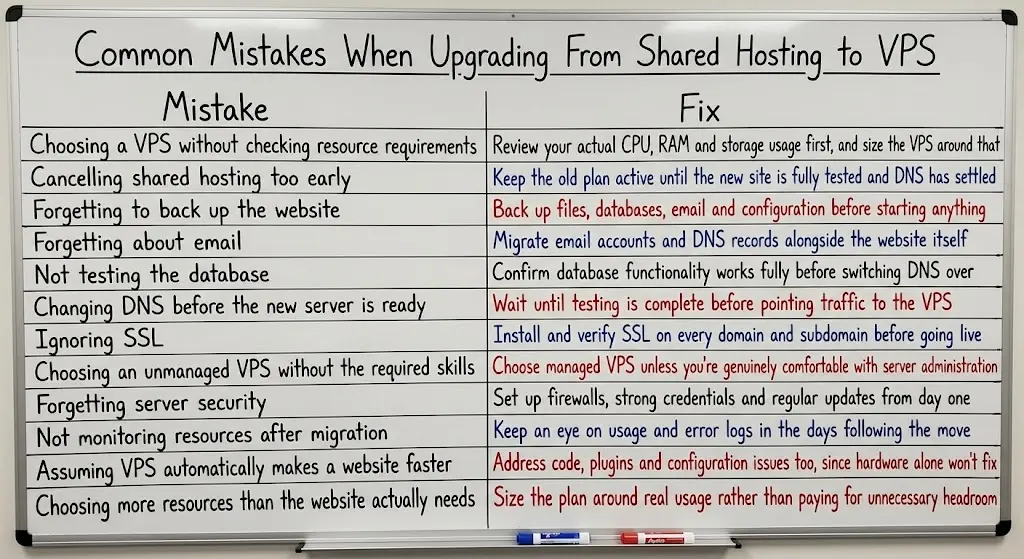
| Mistake | Fix |
|---|---|
| Choosing a VPS without checking resource requirements | Review your actual CPU, RAM and storage usage first, and size the VPS around that |
| Cancelling shared hosting too early | Keep the old plan active until the new site is fully tested and DNS has settled |
| Forgetting to back up the website | Back up files, databases, email and configuration before starting anything |
| Forgetting about email | Migrate email accounts and DNS records alongside the website itself |
| Not testing the database | Confirm database functionality works fully before switching DNS over |
| Changing DNS before the new server is ready | Wait until testing is complete before pointing traffic to the VPS |
| Ignoring SSL | Install and verify SSL on every domain and subdomain before going live |
| Choosing an unmanaged VPS without the required skills | Choose managed VPS unless you’re genuinely comfortable with server administration |
| Forgetting server security | Set up firewalls, strong credentials and regular updates from day one |
| Not monitoring resources after migration | Keep an eye on usage and error logs in the days following the move |
| Assuming VPS automatically makes a website faster | Address code, plugins and configuration issues too, since hardware alone won’t fix them |
| Choosing more resources than the website actually needs | Size the plan around real usage rather than paying for unnecessary headroom |
That last one is worth sitting with for a moment.
A more expensive plan doesn’t automatically mean a faster website, particularly if the real bottleneck is bad code, poorly optimized plugins, inefficient database queries, or configuration that was never properly tuned in the first place.
It’s a mistake worth avoiding not just because it wastes money, but because it can mask the actual problem entirely.
A site moved to a bigger VPS without fixing its underlying issues will often just run into the same complaints a few months later, minus the easy explanation of we need more resources.
Upgrade Your Website From Shared Hosting to VPS
Knowing how to migrate from shared hosting to VPS is only useful once you’ve confirmed the upgrade actually makes sense for your website, rather than jumping to it simply because the resources sound appealing.
Truehost Ghana’s VPS options cover both managed and unmanaged setups, with different resource configurations available depending on your workload.
Migration support is also available for eligible upgrades, with Truehost’s current Ghana site positioning VPS hosting specifically as an upgrade path for sites that have outgrown shared hosting, and its migration policy confirms that eligible shared to VPS upgrades can receive migration assistance.
These plans tend to suit websites with growing traffic, businesses running multiple sites or applications, and anyone who needs more server control than shared hosting can offer.
Whatever your situation looks like, it’s worth choosing a plan based on your actual workload rather than the most powerful option available.
Migrating doesn’t have to feel like a leap into the unknown either.
With the right preparation, backups in place, and a bit of patience during testing, moving from shared hosting to VPS is a fairly manageable project rather than the daunting overhaul it can sometimes feel like from the outside.
Ready to make the move? Explore Truehost Ghana’s current VPS plans and find the setup that fits where your website is heading.