 Domains SearchSearch available domain names and claim yours in just a few clicks.
 .GH DomainsFind and register a trusted .gh domain for your business or idea.
 Web HostingAffordable web hosting solutions designed for performance, uptime, and scalability.
 cPanel HostingManage your website without the stress. cPanel hosting gives you everything in one place.
 Reseller HostingCreate, manage, and grow your hosting clients using reliable reseller hosting tools.
 Windows HostingWindows hosting that works smoothly with Microsoft frameworks and applications.
 Email HostingProfessional email hosting that keeps your business communication reliable and secure.
 WordPress HostingFast and secure WordPress hosting optimized for smooth performance and easy management.
 Affiliate ProgramEarn commissions by referring customers to our hosting and domain services.
 .COM Domains
 All DomainsFind the right Ghana domain for your brand and lock it in fast.
 Domain TransferMove your domain to us with a smooth, secure transfer process.
 Whois LookupCheck domain ownership and registration details instantly with our WHOIS lookup.
 SSL CertificatesSecure your website and protect your visitors with trusted SSL certificates.
 VPS HostingUpgrade to VPS hosting today and enjoy better speed, uptime, and flexibility.
 Managed VPSManaged VPS for businesses and developers who want full control without server management worries.
 Dedicated ServersGet maximum speed and reliability with dedicated servers built for serious websites and apps.
 AI Website BuilderStart your website today with our AI builder and go live in minutes.
 Online ShopStart selling online today with your own professional online shop.
 Web Design ServiceProfessional web design services that make your brand stand out online.
 Local SEO
 BlogHelpful articles, tutorials, and updates for building your online presence.
 Contact UsNeed help or more information? Connect with us anytime.
Buying a domain and building a website doesn’t automatically put that website online.
The files making up your site need somewhere to actually live, and a server that can respond the moment someone tries to visit.
So how does web hosting work in practice?
It involves a handful of moving parts working together: your website files, the hosting server storing them, your domain name, DNS, the visitor’s browser, and the internet connection tying it all together.
This article walks through what actually happens from the moment someone types your domain into their browser to the instant the webpage appears on their screen.
None of this happens in a single leap.
It’s a chain of small, fast handoffs between different systems, each doing one specific job before passing things along to the next.
Once you can see each link in that chain clearly, the whole process stops feeling like a black box.
How Does Web Hosting Work?
Here’s the short version before we unpack each step properly.
| Step | What Happens |
|---|---|
| 1 | A visitor enters your domain |
| 2 | DNS finds the server connected to the domain |
| 3 | The browser connects to the server |
| 4 | The server receives the request |
| 5 | The server retrieves or generates the requested content |
| 6 | The server sends the response back |
| 7 | The browser loads the webpage |
1) The Visitor Enters Your Domain Name
It starts simply enough.
Someone types something like yourbusiness.com.gh into their browser’s address bar.
Before the browser can actually request your website, it first needs to figure out where that domain is hosted, since a domain name on its own doesn’t point anywhere physical.
This step feels instant from the visitor’s side, but there’s already a fair bit happening behind the scenes before the browser even sends its first real request.
The browser typically checks its own cache first, then moves on to asking elsewhere if it doesn’t already have an answer stored locally.
2) DNS Connects the Domain to the Server
This is where DNS comes in.
Without getting too technical, DNS is essentially the system that matches a human readable domain name with the IP address of the server where your website actually lives.
DNS relies on a few important pieces: domain names, DNS records, IP addresses, nameservers, and A records specifically, which point a domain directly to a server’s IP.
When DNS is configured incorrectly, whether that’s a wrong A record or outdated nameservers, visitors end up either seeing an error, landing on the wrong website entirely, or seeing nothing at all.
DNS also isn’t instant.
Changes here can take time to spread across the internet before everyone sees the update consistently.
3) The Browser Connects to the Hosting Server
Once the browser knows exactly where your website is hosted, it connects to that server directly.
This connection typically happens over HTTP or HTTPS, using port 80 or port 443 respectively.
HTTPS adds SSL or TLS encryption on top of the connection, which counts for a lot since it keeps the data passing between the visitor’s browser and your server private and tamper resistant.
This is particularly important for anything involving logins, payments or personal information.
Though it’s become the expected standard for pretty much any website at this point, regardless of what it does.
4) The Server Receives the Website Request
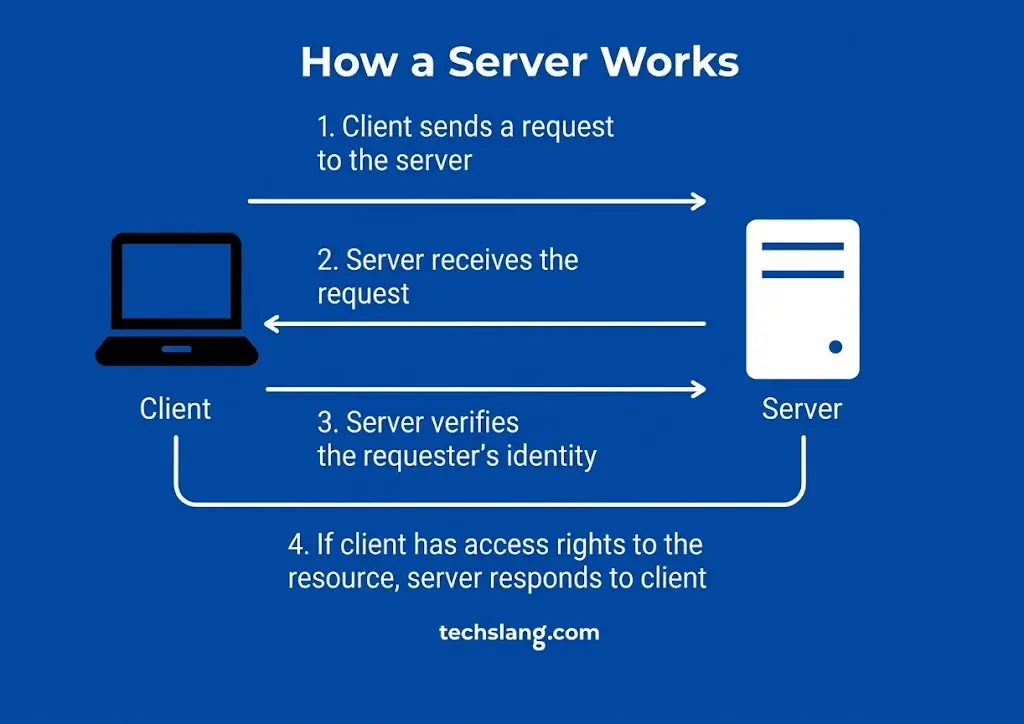
With the connection established, the browser sends an HTTP request asking for a specific resource.
A request like GET /about-us tells the server exactly which page or file the visitor is trying to reach.
At this point, the server’s job is to figure out exactly what needs to be sent back in response, which depends heavily on how the website itself is built.
This is also roughly where the server checks whether the request even makes sense in the first place.
A request for a page that was deleted months ago, or a file that was never there at all, gets flagged here before the server moves on to the next step of actually assembling a response.
5) The Server Finds or Generates the Requested Content
This is really where the interesting part of how web hosting works happens, and it’s worth going a bit deeper than the usual hosting stores your files explanation.
For a static website, the server simply retrieves existing files directly, things like HTML, CSS, JavaScript and images that already exist exactly as they’ll be shown to the visitor.
There’s no extra processing involved. The file exists, and the server hands it over.
A dynamic website works differently.
Here, the server may need to run application code, query a database, pull content from a system like WordPress, process the specific request, and generate the HTML on the spot before sending anything back.
For a WordPress website specifically, this usually means the server processes PHP code and retrieves content from the WordPress database before assembling the final page.
This difference is a big part of why dynamic websites generally need more server resources than static ones.
Generating a page on the spot, every single time someone visits, takes noticeably more CPU and memory than simply handing over a file that already exists.
It’s also why caching tools exist specifically for dynamic sites, since storing a recently generated version of a page temporarily saves the server from redoing the same work for every single visitor.
6) The Server Sends the Response Back to the Browser
Once the server has the content ready, whether retrieved directly or generated on the fly, it sends an HTTP response back to the browser.
This response includes a status code indicating what happened, along with the actual content requested.
A 200 OK status means everything worked as expected.
A 404 Not Found means the requested page doesn’t exist.
A 500 Internal Server Error points to something going wrong on the server’s end rather than the visitor’s.
There’s a lot more detail buried in HTTP status codes generally, but the main thing worth knowing is simply that this status code is how the server tells the browser what actually happened with the request.
These codes end up being genuinely useful beyond just satisfying curiosity about how things work.
Troubleshooting a broken website usually starts by checking exactly which status code is showing up.
Since a 404 points toward a missing file or broken link, while a 500 points toward something misconfigured on the server itself, and knowing the difference narrows down where to look first.
7) The Browser Builds and Displays the Website
Receiving the HTML back isn’t actually the end of the process.
Once the browser has the main HTML document, it typically needs to request several more resources before the page is actually complete: CSS for styling, JavaScript for interactivity, images, fonts, and sometimes video files too.
Only once everything has loaded and been processed does the browser render the final page the visitor actually sees and interacts with.
This is part of why page speed is about more than just how fast the first response comes back.
A page that loads quickly but then waits on a dozen separate image and script requests can still feel slow to an actual visitor.
Even though the server technically responded fast on that very first request.
What Happens Behind the Scenes When Someone Visits Your Website?
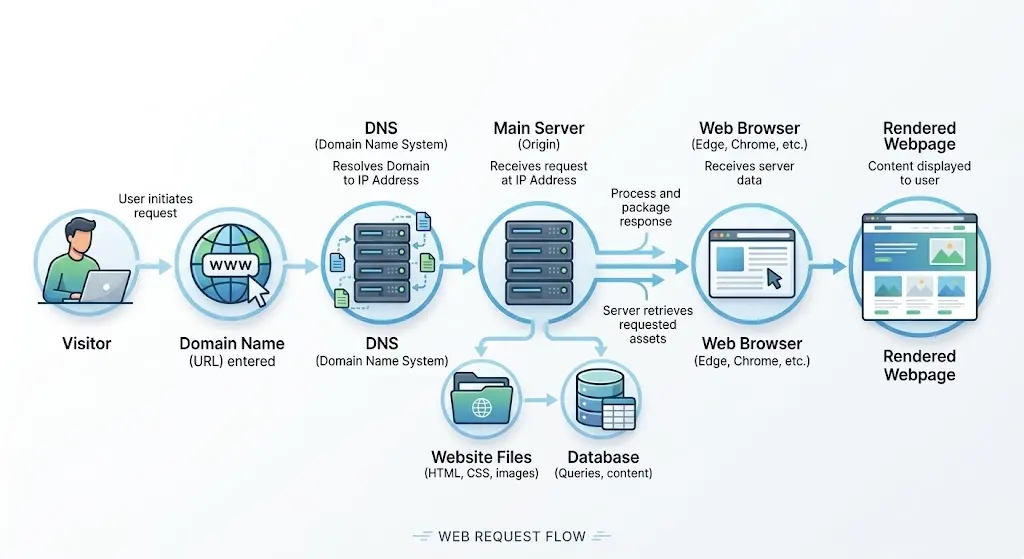
Put simply, the whole sequence looks something like this:
Visitor → Domain → DNS → Server → Website files or database → Server response → Browser → Webpage
Walking through it as a numbered flow makes the sequence a bit clearer:
- A visitor types your domain into their browser.
- DNS resolves that domain to your server’s IP address.
- The browser connects to your hosting server over HTTP or HTTPS.
- The server receives a request for a specific page or resource.
- The server either retrieves existing files or generates the content dynamically.
- The server sends its response, including a status code, back to the browser.
- The browser requests any additional resources and renders the finished page.
All of this typically happens in a fraction of a second, which is part of why web hosting can feel invisible when everything is working properly.
It only becomes obvious something’s happening at all when one of these steps breaks down somewhere along the way.
That invisibility is actually the goal.
A hosting setup working exactly as intended should feel completely unremarkable to the visitor, who just sees a page load normally without ever needing to think about DNS, servers, or status codes at all.
It’s only when something in that chain breaks that the underlying process suddenly becomes relevant to anyone outside of the people running the website.
What Does a Web Hosting Server Actually Store?
A hosting account can hold a fair amount more than just a homepage. Here’s a breakdown of what typically lives inside one.
| Website Component | What It Contains |
|---|---|
| HTML files | Page structure |
| CSS files | Design and styling |
| JavaScript | Interactive functionality |
| Images | Photos, graphics and other media |
| Videos | Video files where hosted |
| Databases | Website content and structured data |
| Application files | WordPress, plugins and other software |
| Email data | Mailboxes where email hosting is included |
Exactly what gets stored depends heavily on the type of website involved.
A simple static site might only need HTML, CSS and a handful of images.
A WordPress site adds application files and a database into the mix.
A business running email through the same hosting account adds mailbox data on top of everything else.
Knowing which of these components a given website actually needs is also a big part of picking the right hosting plan in the first place.
A plan generous with storage but light on database resources suits a static portfolio site well, while a WordPress store with a growing product catalog needs the reverse, more database headroom and processing power, rather than raw storage alone.
Knowing how web hosting works this way, as a sequence of specific steps and stored components, makes it a lot easier to troubleshoot problems when something goes wrong.
And makes choosing the right hosting plan for your particular website a more informed decision than just picking whatever’s cheapest.