 Domains SearchSearch available domain names and claim yours in just a few clicks.
 .GH DomainsFind and register a trusted .gh domain for your business or idea.
 Web HostingAffordable web hosting solutions designed for performance, uptime, and scalability.
 cPanel HostingManage your website without the stress. cPanel hosting gives you everything in one place.
 Reseller HostingCreate, manage, and grow your hosting clients using reliable reseller hosting tools.
 Windows HostingWindows hosting that works smoothly with Microsoft frameworks and applications.
 Email HostingProfessional email hosting that keeps your business communication reliable and secure.
 WordPress HostingFast and secure WordPress hosting optimized for smooth performance and easy management.
 Affiliate ProgramEarn commissions by referring customers to our hosting and domain services.
 .COM Domains
 All DomainsFind the right Ghana domain for your brand and lock it in fast.
 Domain TransferMove your domain to us with a smooth, secure transfer process.
 Whois LookupCheck domain ownership and registration details instantly with our WHOIS lookup.
 SSL CertificatesSecure your website and protect your visitors with trusted SSL certificates.
 VPS HostingUpgrade to VPS hosting today and enjoy better speed, uptime, and flexibility.
 Managed VPSManaged VPS for businesses and developers who want full control without server management worries.
 Dedicated ServersGet maximum speed and reliability with dedicated servers built for serious websites and apps.
 AI Website BuilderStart your website today with our AI builder and go live in minutes.
 Online ShopStart selling online today with your own professional online shop.
 Web Design ServiceProfessional web design services that make your brand stand out online.
 Local SEO
 BlogHelpful articles, tutorials, and updates for building your online presence.
 Contact UsNeed help or more information? Connect with us anytime.
Installing WordPress itself is the easy part, a few clicks through most control panels and you’re looking at a blank dashboard ready to go.
Choosing where to host it is where things get genuinely confusing.
Nearly every hosting company advertises the same list:
- SSD storage,
- unlimited bandwidth,
- free SSL,
- backups,
- one-click WordPress installation,
- and a cheap introductory price that looks almost too good to pass up.
The real difference between providers shows up once you look past that list.
What does the hosting actually give your website in practice?
What limitations kick in once you’re using it?
What does it cost once the promotional period ends?
And can the plan genuinely handle what your site needs, today and a year from now?
For someone building their first WordPress site in Ghana, these questions carry far more weight than the headline price on a homepage.
Since that number rarely reflects what you’ll actually be paying or getting six months in.
This guide walks through exactly how to evaluate the best WordPress hosting in Ghana for your situation.
Whether you’re launching a blog, a business website, a portfolio, or an online store.
How to Choose the Best WordPress Hosting in Ghana
Here’s a quick overview of what to check before looking at individual plans.
| Factor | What to Check |
|---|---|
| Price | Introductory and renewal pricing |
| Performance | Storage technology, CPU/RAM resources, caching |
| Traffic | Expected visitors and resource limits |
| Storage | SSD/NVMe space and file limits |
| Security | SSL, malware protection, firewall |
| Backups | Frequency, retention and restoration |
| Support | Channels, availability and WordPress assistance |
| WordPress features | Installer, updates, caching and staging |
| Scalability | Upgrade options when traffic grows |
| Location | Server/network location and expected audience |
Now let’s go through each of these properly.
1) Start With the Type of WordPress Website You Are Building
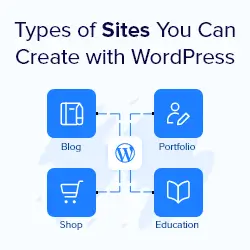
Before comparing a single plan, figure out what your site actually needs to do.
A personal blog, a business website, a portfolio, a news or content site, a small ecommerce store, a membership website, a genuinely high-traffic site.
And someone managing multiple WordPress sites all have very different requirements, even though they might all technically run on WordPress hosting.
A five-page business website showcasing services and contact details doesn’t need the same resources as a WooCommerce store processing hundreds of orders with a growing product catalog.
The store needs more database capacity, more consistent uptime during sales periods, and generally more headroom for traffic spikes.
Placing both on the same entry-level plan just because they’re both WordPress sites is exactly the kind of mismatch that leads to frustration down the line.
Figure out your category first, then shop with that in mind.
2) Check the Hosting Price Beyond the Advertised Monthly Rate
This is one of the most important sections here, because hosting prices can look wildly different depending on how they’re billed.
A number on a homepage rarely tells the whole story.
Pay attention to the difference between monthly, annual, and multi-year billing, since longer commitments almost always come with a lower effective monthly rate.
More importantly, separate the introductory price from the renewal price, these can differ by a significant margin once your first term ends.
Factor in domain costs if one isn’t included, SSL costs if it’s not bundled free, migration fees if you’re moving an existing site, backup costs if they’re sold separately, and email account limits if your business needs several addresses.
Check whether displayed prices include tax, and confirm the currency and payment options actually work for Ghanaian customers, local card support or mobile money can count for a lot more than people expect.
Cheap hosting isn’t automatically bad, and that’s worth saying plainly.
The real skill is calculating your actual first-year cost and your actual renewal cost.
Then comparing those two numbers against what you’d pay elsewhere, rather than comparing the flashy introductory price alone.
A plan that looks expensive at first glance can easily work out cheaper over three years than one that looks like a bargain on month one, once the renewal jump is factored in properly.
3) Look at the Resources Included With the Plan
Storage alone tells you very little about whether a WordPress hosting plan will actually perform well.
A handful of other resources count just as much, sometimes more.
Check the
- SSD or NVMe storage on offer,
- CPU resources,
- available RAM,
- how many websites the plan allows,
- how many databases you get,
- inode or file limits (relevant if your site accumulates a lot of small files over time),
- PHP worker or process limits where the provider actually discloses them,
- the bandwidth or traffic policy,
- included email accounts,
- and overall database limits.
This is also the right place to clear up a common misunderstanding.
A plan advertising unlimited bandwidth does not mean unlimited server resources.
Bandwidth describes how much data your site transfers, nothing more.
CPU, RAM, and other account-level limits are entirely separate, and they’re usually what actually determines whether your site holds up under real traffic.
4) Check How the Hosting Handles Website Speed
It’s tempting to reduce this whole topic to SSD equals fast, but that’s only one piece of a much bigger picture.
Look at the underlying server hardware, the storage technology (SSD or NVMe).
Whether server-side caching is included, whether the provider uses LiteSpeed or another performance-focused web server technology.
CDN compatibility if you want to serve content faster to a wider audience, supported PHP versions, database performance, image optimization tools.
The network or server location relative to your visitors, and compatibility with popular WordPress caching plugins.
It’s also worth being honest that hosting is only one part of WordPress performance.
A badly configured theme, a page stuffed with unnecessary plugins, or unoptimized images can still slow a site down even on genuinely excellent hosting.
Good hosting gives your site the best possible foundation. It doesn’t automatically fix everything built on top of it.
5) Check Where Your Website Visitors Are Located
For a Ghanaian audience specifically, where your hosting infrastructure physically sits does count for something in the visitor experience, though not necessarily in the way people assume.
Think about whether your audience is primarily Ghanaian, broader West African, or genuinely international.
Server location and network latency both affect how quickly your site loads for visitors depending on their distance from that server.
A CDN can help bridge that gap for visitors further away, serving cached content from a location closer to them rather than routing every request back to a single origin server.
Worth being careful here though: hosting in Ghana doesn’t automatically improve your Google rankings, that’s a common claim worth being skeptical of.
The genuinely useful benefit is a better visitor experience and stronger network performance for your actual audience.
Which is a real and worthwhile advantage on its own, just not an SEO shortcut.
6) Look at the Security Features Included
A decent WordPress hosting plan should come with a reasonable baseline of security built in.
Check for
- free SSL,
- firewall protection,
- malware scanning or removal where it’s offered,
- DDoS protection if available,
- secure account access practices,
- PHP version management (so you’re not stuck on an outdated, vulnerable version),
- regular security updates on the server side,
- isolation between accounts on shared servers,
- and protection against the kinds of attacks WordPress sites commonly face.
It’s worth separating what hosting handles from what’s still your responsibility as the site owner.
Your host can secure the server.
You’re still responsible for strong passwords, keeping plugins and themes updated, and generally not leaving obvious doors open on your own end.
7) Find Out How Backups Actually Work
Choose a host with backups isn’t nearly specific enough advice on its own, so it’s worth digging into the actual terms.
Check how frequently backups run, how long they’re retained before being deleted.
Whether the process is fully automated or needs manual triggering, whether the entire website gets backed up or just certain parts.
Whether databases are backed up alongside files, how restoration actually works when you need it, whether restoring a backup costs extra.
And whether backups are stored separately from the live site (important, since a backup sitting on the same compromised server doesn’t protect you from much).
Daily backups included sounds reassuring on a pricing page.
But it becomes genuinely useful information only once you know the retention period and exactly how restoration works.
A daily backup retained for just 24 hours is a very different safety net than one retained for 30 days.
8) Check WordPress-Specific Features
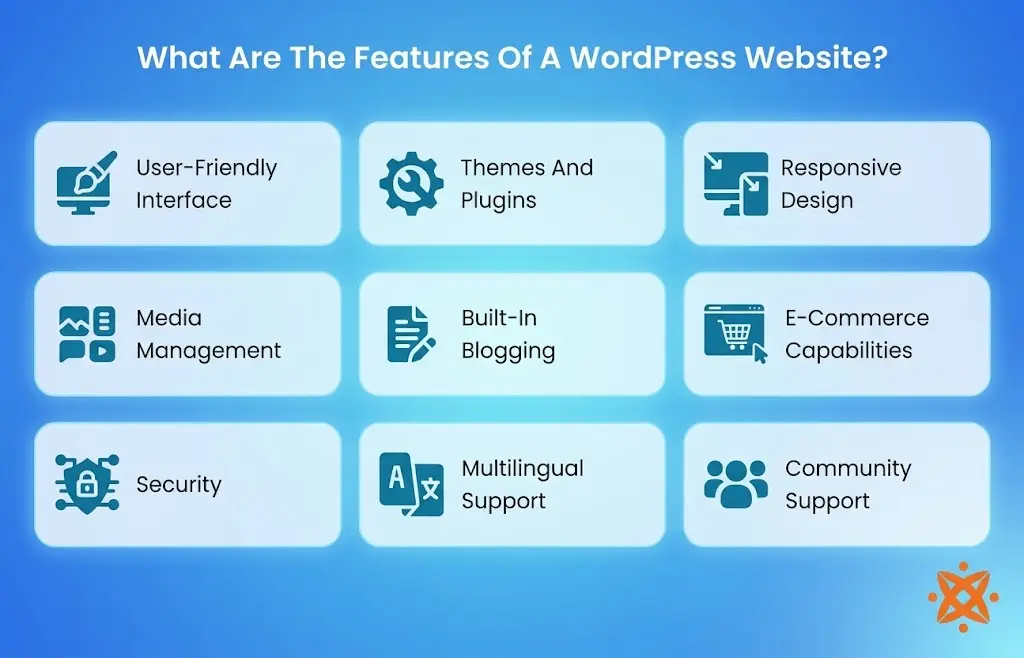
Beyond general hosting resources, look specifically at what’s built for WordPress.
- One-click WordPress installation,
- automatic WordPress updates,
- plugin and theme management tools,
- WordPress-specific caching,
- staging environments for testing changes safely,
- WP-CLI access if you work with WordPress from the command line,
- automatic backups,
- WordPress migration assistance,
- and support staff who genuinely know WordPress rather than just generic hosting questions.
Here’s an important distinction worth keeping in mind: WordPress hosting doesn’t automatically mean managed WordPress hosting.
Plenty of plans labeled WordPress hosting are really just standard shared hosting with WordPress pre-installed and a few WordPress-friendly tweaks.
True managed WordPress hosting goes further, handling updates, security, and performance tuning specifically for WordPress on your behalf.
9) Check Customer Support Before You Need It
Support quality is easy to overlook when everything’s working fine, and painfully obvious the moment something breaks.
Check what channels are available: live chat, ticket support, phone support, and whether coverage is genuinely 24/7.
Ghana-based or local support can mean faster, more relevant help, along with WordPress-specific assistance, migration help, and DNS or domain support when you need it.
Think through a few realistic scenarios where support actually counts for a lot.
WordPress won’t load. SSL suddenly isn’t working. Your domain isn’t pointing correctly after a change.
Email stops working right after a DNS update. A plugin update breaks the site.
A migration fails partway through.
In every one of these situations, how quickly and competently your host responds makes a real difference to how much stress and downtime you actually experience.
10) Check the Hosting Provider’s Upgrade Options
A plan that fits perfectly today might not fit in a year, so it’s worth checking the path forward before you need it urgently.
Look at whether you can upgrade within shared hosting tiers smoothly, whether higher-resource WordPress hosting is available as a next step, and whether VPS hosting, cloud hosting, or dedicated resources exist further up the ladder if your site eventually needs that level of power.
Check whether migration assistance is available if you do need to move to a different plan type.
And whether upgrading actually requires rebuilding your site from scratch or simply adjusting your existing account’s resources.
The real question isn’t just does this entry-level plan work for me right now.
It’s what happens after this plan stops being enough.
Is WordPress Hosting Better for a Ghanaian Website?
For most Ghanaian website owners, dedicated WordPress hosting is genuinely worth choosing over generic shared hosting, provided the specific plan includes the right fundamentals.
The current Truehost WordPress offering is a useful example of what a solid starting point looks like: one-click WordPress installation, free SSL, SSD storage, daily backups, free migration, cPanel, included email accounts, and unlimited bandwidth across its listed plans.
Plans do differ meaningfully as you move up the lineup, in storage, website limits, and expected monthly visitor capacity.
So it’s worth matching the specific tier to your actual site type from section one above rather than defaulting to the cheapest option automatically.
Billing period affects the real cost considerably too, as covered in section two.
Truehost’s WordPress Starter plan is currently listed from around GH₵315.00 a month when billed on a triennial term.
Including 30 GB of SSD storage, support for up to 10 websites, capacity for roughly 25,000 monthly visits, free website migration, a free domain, and automated SSL.
It’s worth verifying the live pricing directly before making a final decision, since promotional rates and included features can shift over time, and what’s accurate today may have changed by the time you’re ready to sign up.
Frequently Asked Questions
Is WordPress hosting more expensive than regular shared hosting in Ghana?
Not necessarily. Many providers price WordPress-optimized plans at the same level as standard shared hosting, sometimes even slightly cheaper as a promotional offer, since the underlying infrastructure is often very similar.
Do I need managed WordPress hosting as a beginner in Ghana?
Not strictly, but it can reduce the technical burden considerably. Standard WordPress hosting with a one-click installer works fine for most beginners, while managed hosting adds automated updates and extra support that some newer site owners find reassuring.
Does hosting my WordPress site in Ghana improve my SEO?
Not directly. Server location mainly affects loading speed for nearby visitors, which supports a better user experience, but it isn’t a direct Google ranking factor on its own.
Can I switch WordPress hosts later without losing my website?
Yes, most providers, including Truehost, offer free or assisted migration to help move your files, database, and settings over to a new hosting account without starting from scratch.